Shop / Generator interfaces / Generator pHAT v3
Consider the USB Connector instead. It works with any Raspberry Pi, and virtually any computer with USB: Molex goes in, USB-C comes out. There’s no hunting for a case that fits around a pHAT and no conflicts stacking it with PoE adapters. Get the Molex USB Connector or, for an indoor Pi on a Cat5/6 run, the RJ45 USB Connector.
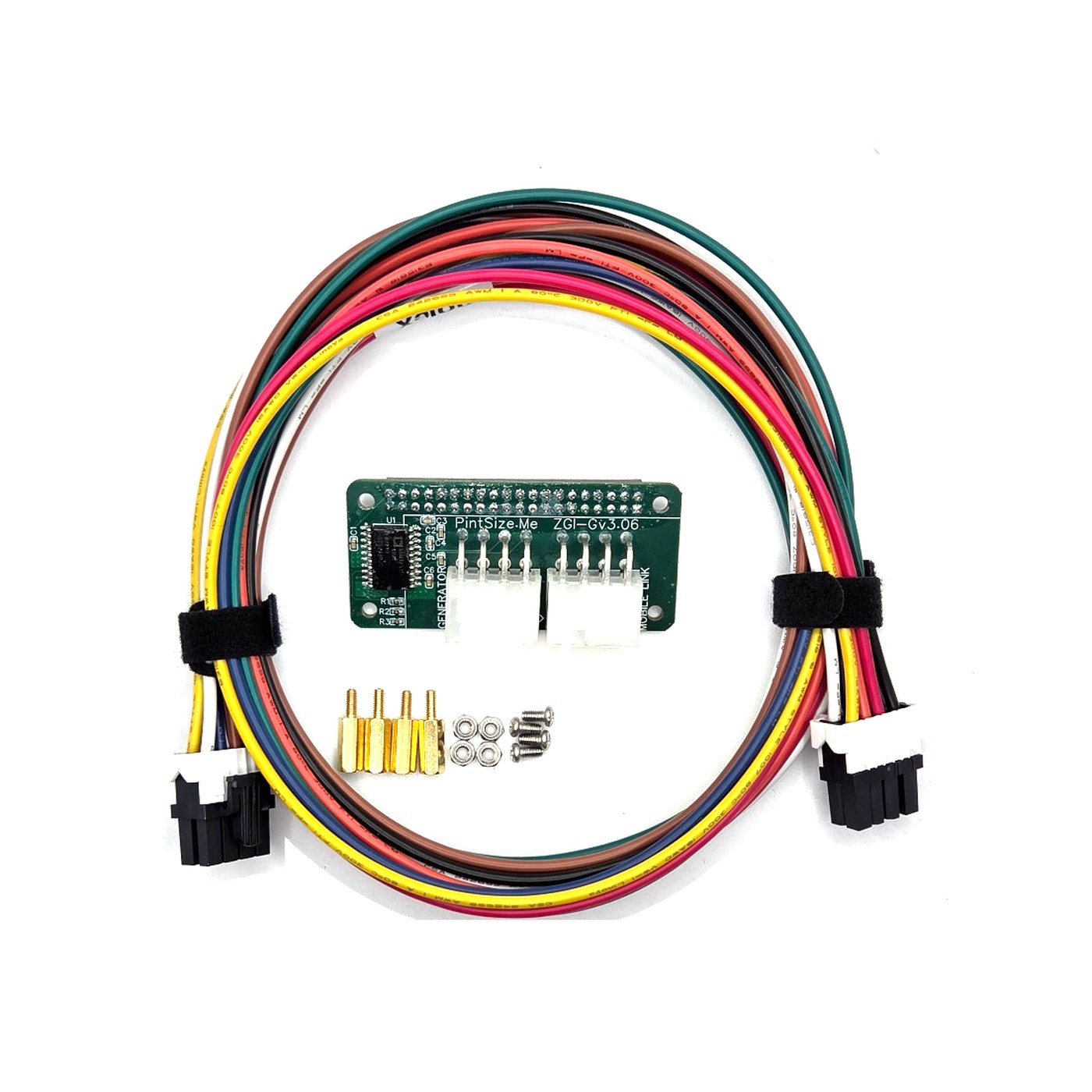
Connects GenMon on your own Raspberry Pi Zero 2 to the generator's Molex accessory port, with electrical isolation between the Pi and the generator.
Instructions
- Setup guide: HAT & pHAT v3 instructions
- The pHAT can’t power the Pi: you always need a power source for it.
- The loopback tester is for bench testing only. Never connect it to a generator.
What's in the box
- pHAT v3 (Pi Zero 2)
- 1 m Molex cable (data cable)
- Screw, nut and standoff set (mounts the HAT/pHAT to the Pi)
- Loopback tester
What's not in the box
- Raspberry Pi Zero 2 (with header pins) and micro-SD card
- Power source for the Pi. A motorcycle USB adapter with a quality USB cable that has the right end is a popular choice.
- Case, enclosure or mounting hardware for the assembled Pi (screws for mounting the pHAT to the Pi are included)
The v3 pHAT adds electrical isolation: the Pi and the generator have no electrical connection on the data lines. A chip carries the signal across a tiny gap using light, which helps protect your generator.
Which Raspberry Pi?
The pHAT is sized for the Pi Zero 2: no Ethernet, USB via OTG only. Great for headless installs, lowest power and heat, indoors or outdoors. Most are sold without header pins: buy one with pins, or be ready to solder them.
For a Pi 3A+, 3B, 3B+, 4B or 5B, get the Generator HAT v3.
Not recommended
- Pi Zero: no WiFi or Ethernet; the lack of networking is a big hurdle.
- Pi Zero W/WH: the slowest option. Some people haven’t been able to build GenMon’s libraries on it.
Compatibility
Used successfully with Evolution, Evolution 2.0 and Evolution Liquid Cooled controllers. It should work with PowerPact units that have an Evolution controller (look for the 8-pin Molex accessory port under the controller). The hardware is compatible with Nexus, but several people haven’t been able to get GenMon working with Nexus (configuration, not hardware), so buying for Nexus is at your own risk.
Generator controller: the electronics are the same for every controller; the choice tells us how to help if you need support. Power Zone 200 uses different cabling.
Options explained
PintSize Cloud subscription: see your generator, or all your generators in one view, from anywhere, and if your generator and GenMon support it, run commands remotely (start, start & transfer, stop, clear errors). Because the cloud can’t be used until your hardware arrives, we add a week to the first year to cover shipping. Installing the client takes two commands in a terminal or over SSH; the guide has a short version and a step-by-step one. The Raspberry Pi Zero 1.1W can’t run the PintSize Cloud client.
MobileLink: with a splitter, an RS-485 MobileLink (mainly the WiFi MobileLink on Evolution 2 / Sync 3) can run alongside GenMon. Every cellular and Ethernet MobileLink we’ve seen is RS-232, which supports only one device, and Power Zone 200 “Next Gen” generators only have the RS-232 output: with RS-232 MobileLink you choose GenMon or MobileLink, not both.
Molex splitter: a single square with 3 Molex ports, for one RS-485 MobileLink and one GenMon device. Same as the Molex Splitter listing.
RJ45 splitter: a pair. One piece goes in the generator and splits the Molex port into a Molex connector (for an optional RS-485 MobileLink) and an RJ45 port. The other turns RJ45 back into Molex. Standard Cat5/6 cable with standard Ethernet pinouts then carries the Molex data, so the Pi can sit indoors with climate control, better security and more networking options. It isn’t a networking device. We’ve seen runs over 150 ft; keep yours as short as is reasonable.
Loopback tester: instead of hunting for a piece of wire, plug the Molex cable into the pHAT and the other end into the tester. It’s the same tester we use to bench-test every unit. Never plug it into a generator.
Do I need a power cord?
Yes, always. The current pHATs can’t power the Pi. Videos showing a HAT or pHAT without a power cord are of an old version (not ours) that only worked with a specific controller, a specific Pi and some luck.
Reviews
No reviews yet.
Bought from us? Leave a review from your order page or My orders.